Models, ready from the factory
BixinAI selects today's advanced local models compatible with S1, preinstalled at the factory so model inference runs on the device.
LOCAL INFERENCE BixinAIBixinAI
NiuClaw S1NiuClaw S1
Local inference, local storage; local AI can run even when disconnected.
Offline use, data never leaves the device, privacy fully in your control.
Factory-preinstalled curated local models and NiuClaw agent or well-known agents such as WorkBuddy.
Local inference requires no Token purchase and is not billed by Token.
Windows by default, so AI is ready out of the box.
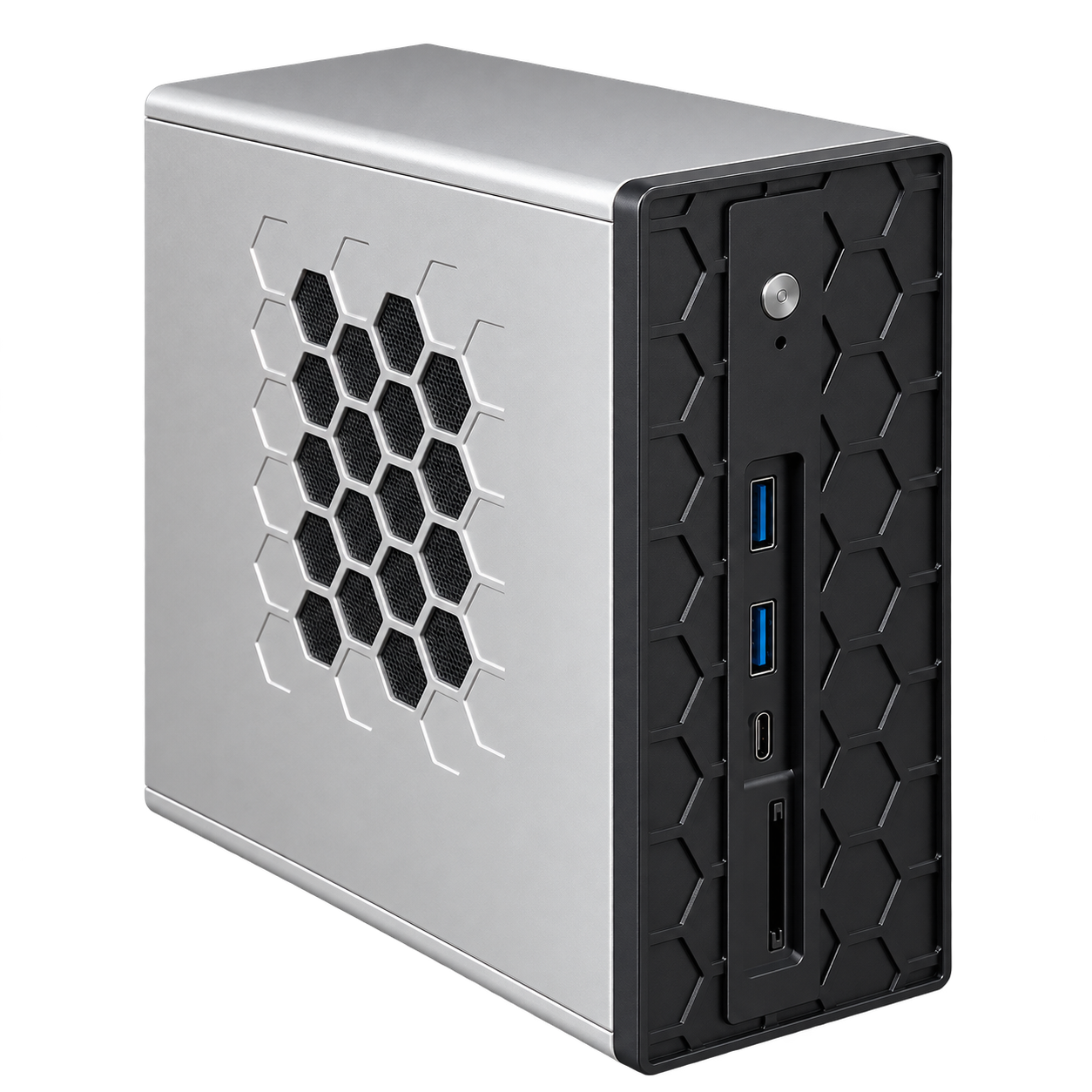
360° PRODUCT VIEW
Drag the chassis to view different angles.
You can also switch to actual product photos at any time.
01 / LOCAL INTELLIGENCE
Continuing the office agent experience of the NiuClaw series,
S1 further provides local compute, supporting the host in
running local model inference.
BixinAI selects today's advanced local models compatible with S1, preinstalled at the factory so model inference runs on the device.
LOCAL INFERENCERuns Windows by default, placing everyday office software, files, and agents in a familiar work environment.
WINDOWS WORKSPACEShips with NiuClaw agent software. From software configuration to getting started, the official guide walks you through the first step.
View the NiuClaw user guide ↗HARDWARE / Core hardware configuration
CPU, GPU, and NPU compute in coordination,
paired with large memory and flexible expansion,
providing the foundation for running local models.
AMD Ryzen AI processor
Capacity and expansion specifications are subject to the confirmed configuration sheet.
2 × RJ45 · subject to markings on the device
Both front and rear have Type-C; rear is labeled USB4
See the rear product image for display port layout.
Specific dimensions are subject to the new model's configuration sheet.
Factory-preinstalled NiuClaw agent software
Hardware specifications are listed according to the 395 configuration in product materials; actual supplied configuration is subject to the selected option. Memory is the maximum supported capacity; the number of storage bays does not represent the number or capacity of factory-installed drives. * VRAM capacity follows the labeling in the materials; actual usable capacity is subject to the actual configuration and settings; TOPS is a combined compute metric and does not represent the generation speed of any specific model.
02 / ON-DEVICE COMPUTING
Local models included out of the box; no need to purchase Tokens.
Local inference is not billed by Token, with no Token recharge quota limits.
Factory-selectedBixinAI continuously evaluates currently advanced models and selects models that balance intelligent capabilities and S1 hardware compatibility for factory preinstallation.
Continuous updatesOfficial continuous model update maintenance keeps up with more advanced, compatible models; users can also update or replace local models themselves.
The above Token-free benefit refers to running preinstalled local models on this device; actual running speed and capacity are affected by hardware and model configuration. If cloud models or third-party paid services are selected, their fees are calculated according to the corresponding service rules.
YOUR LOCAL AI WORKSPACE
NiuClaw S1 · dedicated compute,
Connecting work, exploration, and creation.
03 / AGENT ECOSYSTEM
Windows by default, pre-installed with NiuClaw.
It also supports the office agents you are used to using.
YOUR BUILT-IN AGENT
Once the host arrives, the agent software is already in place.
Learn how to use and configure the software through the official user guide.
Supports WorkBuddy office agent
Supports Qwen Office agent
Supports office agents such as Doubao Work
Third-party software must be installed, logged in to, and configured according to its requirements; functions and services are subject to the descriptions provided by each software provider.
LOCAL AI WORKSPACE / Industry and creative scenarios
Case, R&D, business, and personal data,
deserve a work environment you control.
When an organization requires sensitive business data to stay on designated devices, intranets, or project environments, S1's local compute power and pre-installed models provide the foundation for a dedicated AI workstation. From industry data management to local video creation, choose your scenario and see which specific task you can start with.
One repository per case makes experience retrieval more organized.
Scenario illustration · solution needs adaptationSolo practitioners · boutique law firms · litigation teams
Materials for entrusted cases should not be uploaded casually to public AI; you want to reuse experience from past years while avoiding cross-client mixing.
“Please extract a timeline from the materials in this case, cite the source document for each item, and list facts still requiring manual confirmation.”
Case repositories and access permissions must be configured; facts, citations, and legal judgments are reviewed by lawyers.
Spend less time digging through files and more energy on service and processing.
Scenario illustration · solution needs adaptationNon-classified government office work · public institution offices · government service departments
Public information and internal business data have clear usage boundaries; without approval, they cannot be handed to external services for processing.
“Generate a processing material checklist based on local policy materials, cite the source of clauses, and flag conflicts in materials for review.”
Only non-classified scenarios are discussed. Unit approval and adaptation assessment are required; no claim is made that this product has classified qualifications or government compliance certification.
Let important materials form reusable project assets.
Scenario illustration · solution needs adaptationCorporate legal · board office · M&A project team
Trade secrets and undisclosed decision-making materials need to be confined to environments approved by the project team and organization.
“Compare these two versions of the procurement contract, list changes in payment, liability, and termination clauses, and point to their source locations.”
Authorization is per project; output only assists organization, and business and legal conclusions still require review by the responsible person.
Newcomers can find information quickly, and experience is retained.
Scenario illustration · solution needs adaptationR&D engineers · quality team · process department
Core technical materials have commercial value; uploading them to external tools often requires special authorization first.
“Organize the causes, verification steps, and handling results of the last three similar defects, with corresponding test records attached.”
Drawings, CAD, and complex tables require separate adaptation and parsing; AI does not replace engineering verification or safety decisions.
Create images and videos locally, and keep sensitive materials in-house.
Scenario illustration · Image and video models requiring deployment adaptationCross-border sellers · DTC website teams · Brands expanding overseas
New product launches require product images, campaigns require videos, and continuously testing multiple versions consumes generation credits; customer information, suppliers’ lowest prices, and unreleased products are not suitable for casual uploading to external AI. Let NiuClaw S1 handle both local content production and business analysis.
“Use this new product image to create three lifestyle scenes, then generate product showcase videos with different shots; process the materials locally only, for the team to review, edit, and use in campaigns.”
Image and video models and workflows require separate deployment and adaptation; local generation still incurs equipment, electricity, and storage costs, while speed and results depend on the model and configuration. Commercial use must comply with the model license. Store synchronization and campaign management require an internet connection; data permissions, product authenticity, and external-facing content require human confirmation.
Materials are more organized, and review is more focused.
Scenario illustration · solution needs adaptationAccounting firms · tax service teams · corporate internal audit
Client business information and practice materials must be kept confidential, and cross-access between projects must be controlled.
“Based on this project’s voucher catalog, list missing items and numbers to be checked; do not fill in missing amounts on your own.”
Numerical verification, audit judgment, and report issuance are performed by professionals.
Sort out the materials first, then let professionals make the decisions.
Scenario illustration · solution needs adaptationApproved business pilot · Risk control support · Compliance and internal control team
Customer financial information and business data are subject to strict access, entrusted processing, and audit requirements.
“Mark missing documents against the local application materials checklist; do not infer customer credit ratings or make automated approval decisions.”
Subject to institutional approval and security assessment; does not replace business systems or approval decisions for credit, claims, and similar operations.
Leave the organizing work to the tool, and leave judgment to medical staff.
Scenario illustration · solution needs adaptationApproved in-hospital pilot · Medical record management · Medical quality control support
Health information is sensitive; use of materials requires a legal basis, authorization, and in-hospital management procedures.
“Extract missing document items from authorized medical record text and indicate the source; do not generate diagnoses or treatment recommendations.”
Limited to document and knowledge organization assistance; does not make diagnosis, medication, or treatment decisions; requires institutional approval and professional review.
Everyday Q&A is easier, with less personal information circulating.
Scenario illustration · solution needs adaptationCorporate HR · Payroll team · HR shared services
Employee information has purpose and access restrictions and must not be freely provided to unrelated persons or tools.
“Answer annual leave process questions based on local policies, cite policy clauses, and do not retrieve other employees’ salary information.”
Tiered authorization for payroll and files; do not use AI output directly to make hiring, performance, or termination decisions.
Try ideas repeatedly, without paying for every generation.
Scenario illustration · Requires deploying a compatible video modelSelf-media creators · E-commerce merchants · Brand marketing teams
Want to try a few more shots and make a few more versions, but always have to count generation counts and credit consumption? Deploy a compatible open-source video model to S1 and let ideas be tried repeatedly.
“Use this product image to generate a display video with a slow push-in shot, trying warm-light and cool-light atmospheres respectively for editing selection.”
Requires separately deploying video models and workflows compatible with S1; no per-generation payment refers to local inference, with no cloud generation fees, but there are still device, electricity, and storage costs. Generation speed, duration, and resolution depend on the model and configuration; commercial use must comply with the chosen model's license.
KEEP THE WORKFLOW LOCAL
Store data locally → Parse and search locally → Local model inference → Authorized personnel use results
Document parsing, OCR, vector retrieval, plug-ins, logs, and backups also need to be localized according to the plan; disable external model and networked tool calls, configure access permissions, network egress controls, and an approved model update method, then accept according to the actual environment.The above are application planning examples, not delivered cases or industry systems available out of the box. Confidentiality obligations do not mean all materials are legally prohibited from leaving the domain; boundaries are determined by data classification, authorization, contracts, and organizational policies. Local inference does not automatically equal zero external transmission or compliance certification, and S1 is not to be used as a classified system; government, financial, medical, and other scenarios must first pass institutional approval and adaptation assessment.
Confidentiality and security requirements refer to the following public regulations; specific application scenarios are solution projections based on these requirements and do not represent certification or endorsement of the product by the relevant institutions.
DEDICATED DEVICE / The value of a dedicated device
Advantages of NiuClaw compared with software assistants such as WorkBuddy
From local computing power to home learning,
Eight scenarios, clear at a glance.
Below compares two approaches: “assistant running on a daily office laptop” and “tasks independently deployed on NiuClaw.” S1 also supports office agents such as WorkBuddy; cloud tasks are not directly affected by laptop sleep. The image is a scenario illustration.
Installing an assistant on an office computer still requires computer hardware or cloud services to provide model inference computing power.
Preinstalled with selected local models at the factory; on-device inference requires no Token purchase and is not billed by Token.
This item corresponds to S1. Cloud models and third-party paid services are billed separately according to their rules.
Local tasks running on an office laptop will pause when the computer sleeps.
Tasks are configured independently on NiuClaw and are not interrupted when the office laptop goes to sleep.
The device must remain powered, connected to the network, with sleep disabled and services running, and tasks must be configured independently.
When the agent also opens web pages and processes files, lag is more likely when memory is tight.
Dedicated compute handles AI tasks deployed on S1, while your computer focuses on meetings and editing.
This item corresponds to S1; the corresponding tasks need to be deployed to S1 for execution.
Installed on the office laptop, the AI's local environment and daily use remain on the same device.
N1 / N1 mini stores agent memory locally, accumulating long-term context on a dedicated device.
Local memory is not the same as local model inference; how models are called depends on the actual configuration.
If you want the software assistant to run independently and always on, you need to prepare a separate device and configure the runtime environment.
Default Windows, with NiuClaw pre-installed at the factory; together with skills and task management, it builds a dedicated working environment.
Specific tasks, accounts, and tools still need to be configured according to actual use scenarios.
In connected-computer mode, local tasks require this office computer to stay online and running.
Through the configured WeChat, Feishu, DingTalk, or remote desktop entry point, continue to assign tasks and receive results.
An available remote entry point must be configured in advance, and the home device and network must remain operational.
Personal interest research and daily creation share the same computer and runtime environment with workplace office work.
NiuClaw stays at home, the workplace computer focuses on work, and personal data and creations have their own space.
Separating devices to organize personal and office environments does not mean network or data isolation is automatically achieved.
Adults working and children learning use the same computer, so device time needs coordination.
Parents accompany children to practice asking questions, coding, and creating, with learning materials and works organized in one place.
Usage time and access methods are arranged according to family needs; children's use is recommended to be accompanied by parents.
04 / FIND YOUR NIUCLAW
The core difference between S1 and N1, N1 mini,
is the compute capability for local model inference.
| Product capabilities | The choice for local computeNiuClaw S1 | NiuClaw N1 | NiuClaw N1 mini |
|---|---|---|---|
| Product positioning | Local compute agent host | Office agent host | Office agent host |
| Local model inference | Supported · Local compute | Not positioned for local inference | Not positioned for local inference |
| Default operating system | Windows | Windows | Windows |
| Pre-installed software | NiuClaw agent | NiuClaw agent | NiuClaw agent |
| Other office agents | WorkBuddy / Qwen Office / Doubao Work, etc. | WorkBuddy / Qwen Office / Doubao Work, etc. | WorkBuddy / Qwen Office / Doubao Work, etc. |
NIUCLAW S1 / NiuClaw S1
Silver body, black front panel,
bringing dedicated compute into your everyday desktop.
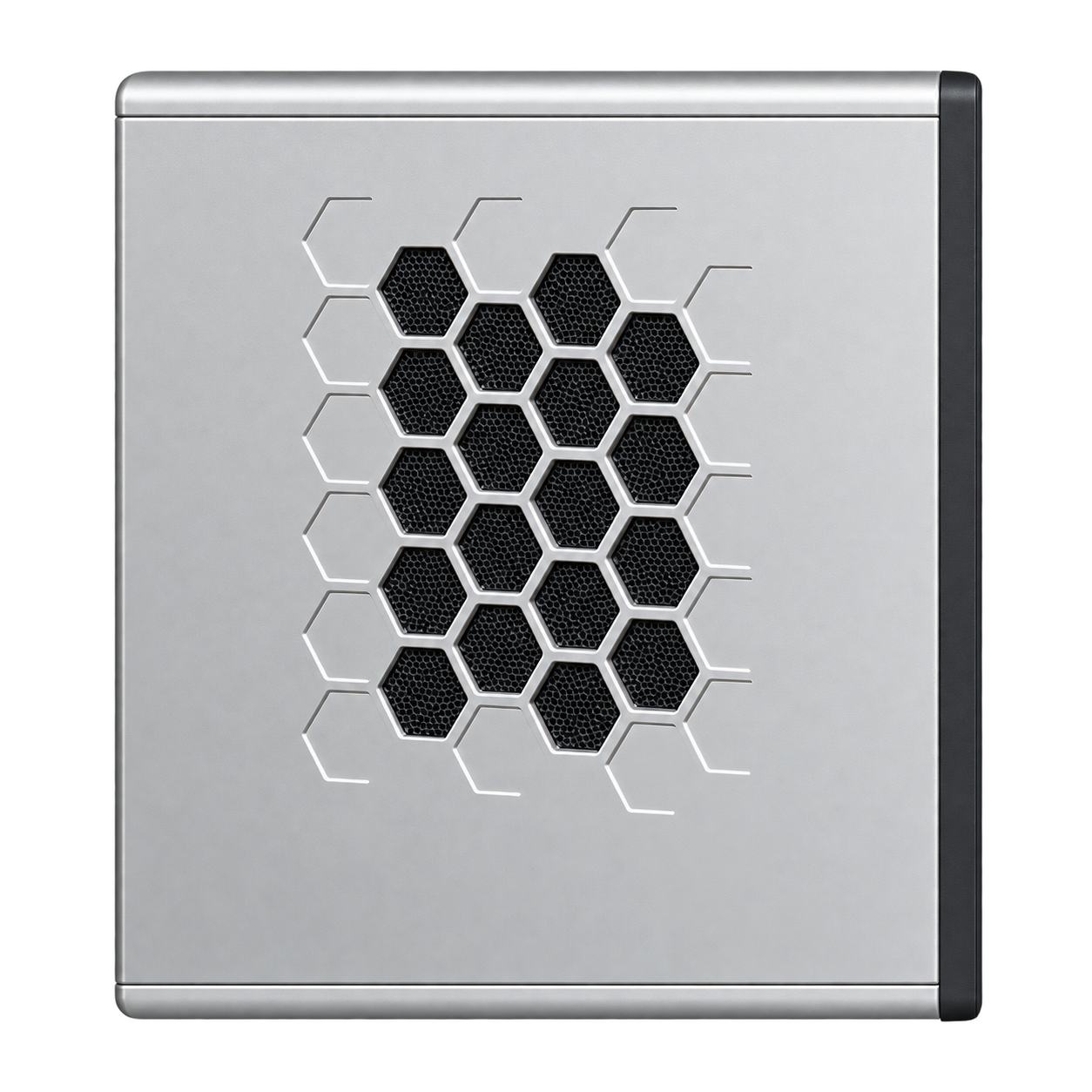 NIUCLAW S1 / PRODUCT DETAIL
05 / YOUR AI DESK
Daily office work and local AI exploration unfold on the same Windows host.
Use NiuClaw or other supported office agents to build your own way of working around daily tasks.
Deploy compatible local models and try AI applications such as text generation and document processing.
Provide a desktop runtime environment for applications that require local inference, and validate the compatibility of models and workflows.
06 / GOOD TO KNOW
S1 provides local inference compute power and comes preinstalled with compatible local models selected by BixinAI; local inference requires no Token purchase. All three products run Windows by default and come with NiuClaw agent software preinstalled.
It comes with Windows by default, preinstalled with NiuClaw agent software and compatible local models selected by BixinAI. Other office agents such as WorkBuddy, Qwen Office, and Doubao Work are also supported and can be installed and configured as needed.
Visit NiuClaw agent official user guide ↗, to learn how to use and configure the software.
S1's local compute power provides the hardware foundation for local model deployment. Whether specific software can connect to local models depends on the model interfaces and configuration methods it supports; support for installing office agents does not mean that all functions of the software can run offline.
No. Using the local models preinstalled on S1 for on-device inference requires no Token purchase, is not billed by Token, and has no Token top-up limit. Actual operating speed, context length, and the scale of tasks that can be handled depend on the hardware and model configuration; if you additionally use cloud models or third-party paid services, charges apply according to their respective rules.
BixinAI continuously evaluates currently advanced models, selects models that balance intelligence capabilities and compatibility with S1 hardware to preinstall at the factory, and continuously maintains model updates. Users can also update or replace compatible local models themselves as needed.
You can consult us based on the model scale, task types, and operating requirements you plan to use, to confirm the compatible hardware configuration and deployment plan.
NIUCLAW S1 / READY FOR LOCAL AI